



uses memory 1049-1075, you will have to go testing it one by one Example (1049-1050-1051 …), this 1100 memory is making your speed very low
Yep the ASRock seem to not be as good. TeamRedMiner will at least give less W for same hashrate. My ASRock usually gets 57-58 on a little less than 120w

I think as soon as AMD figures out how to do a version of fast timings using the linux driver, that’s the only time we can see the same efficiency on HiveOS that we’re seeing on Windows 10.
That or when a miner dev figures it out earlier, like with the ethpill for the 1080/1080ti.
In case you’ve already tried all kinds of OC setting and still getting low hash then you can only blame ASrock and Gigabyte. If you have GPUs like Asus TUF or ROG, it’s very easy to OC and get high hash rate out of the box.
1 Like
Hi, Ihave the following values on my rx6800 family, ambient temp 8 gr at night/ 20 gr at day. the rtx combined rig has a floor standing fan attached. no bios mods. summer is coming - bad news for nvidia owners.
at these settings in windows I had months of uptime, phoenix miner 5.5c used in windows and now in hiveos. The thing is : in hiveon pool I got rejected shares on the two asus and 2 of the sapphire 6800 gpu-s. now mining on ethermine pool zero rejects so far


By the way, after Ethereum 2.0, Grin/cuckatoo32 is probably the way for rx 6800 [at least].
3 Likes

It’s interesting that the cards are all the same and the OC settings are all the same and yet you get very different results (up to 4 MHs difference).
I discovered that temperature has very high impact on the hashrate. When the gpu stays below 48gr. C. and mem below 68gr. C. then hashrate become better. I tried different values for core and mem but i stick to 1350 / 1075. Also one off my cards doesn’t work with mem above 1000. I don’t know why and i also copied the bios from my best card to card with the lowest rate but this didn’t make any difference.
A new beta for PhoenixMiner is out (v5.6a), here’s a snippet from the changelog:
-
Added native kernels for AMD RX6700 GPUs. These are faster than the generic kernels and produce a lot less stale shares
-
Full support for setting clocks, fan speeds, voltages, and memory timings of AMD RX6900/6800/6700 cards
I wonder if it can do fast timings on linux for 6000-series cards.
Are you running on stable version or the beta version of Hive? I’m still on beta, and would like to update to the stable version
Stable, mixed rig with 7 3070 and 2 6800, works pretty fine
Thanks. Just updated to the latest stable version
The last update gave me better results with NBMiner v37.2, increased from 60 Mhs to 61 Mhs.
You guys are lucky with your Asrock posts at 57… I am stuck at 54. On windows I can go from 54 to 61 only one way and that is to increase the power limit slider to +10. I cant seem to find an equivalent value here or any info on exactly which value wattman changes with power limit. I am running 1400 core 700 core v 800 mem controller and 1070 memory clock. All the other values such as SOC give no gains and/or instability. I spent two days rebooting a nd swearing and no luck. I am interested what the other Asrock guys are running for OC stats.
Try to set - 1300 core & 1060 mem. Don’t change anything else except a fan speed.
Phoenixminer 5.6a
60-61mh
You can try the same settings with TRM. You should get around 59-60mh with a lower power consumption.
P.S. Power Color and Gigabyte gpu’s performs better than As*Rock.
1 Like
Thanks for your reply. Ya Asrock sucks but hind sight is always 20/20. I will try a simple oc and see what happens and report back. I also picked up 2 5700xt aorus and i cant get their bios to reflash at all. They are great cards cool and efficient but they cant flash due to their dual bios switch apparently so they are stuck at 52 mhs. I read the super awesome thread on igors about 5700xt and followed it to a T and still didnt post. Also what is TRM?
1400 core and 1070 mem got me a mind blowing 44.1 mhs. This thing sucks. Out of the box is 49 mhs and on windows i played with it for a week to get 54 mhs, until i tried to increase power limit for sheer chance and got it to 61. I have heard a very few people online since having luck with that. When i switched to hive OS I got back to 54 easy but I am totally stuck now and have tried everything i can think of. I have played with all the power settings and seen zero gains. 7 mhs is a ton to leave on the table for just one card. Next fish to fry is to get these aorus 5700xt to take bios mods because that another 3-5 mhs for 2 cards. My shi*ty blower ref 5700xt card is outperforming my aorus by 3 mhs just because its easy to bios mod… so sad.
1 Like
1400 core and 1070 mem got me a mind blowing 44.1 mhs.
This is what is throttling looks like.
Also what is TRM?
TeamRedMiner
You can try latest NBMiner with this:
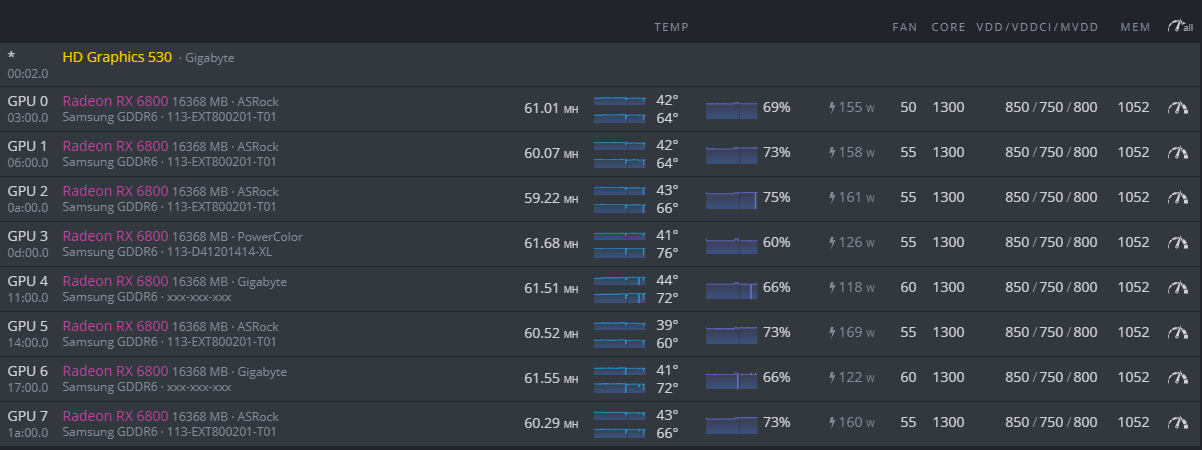
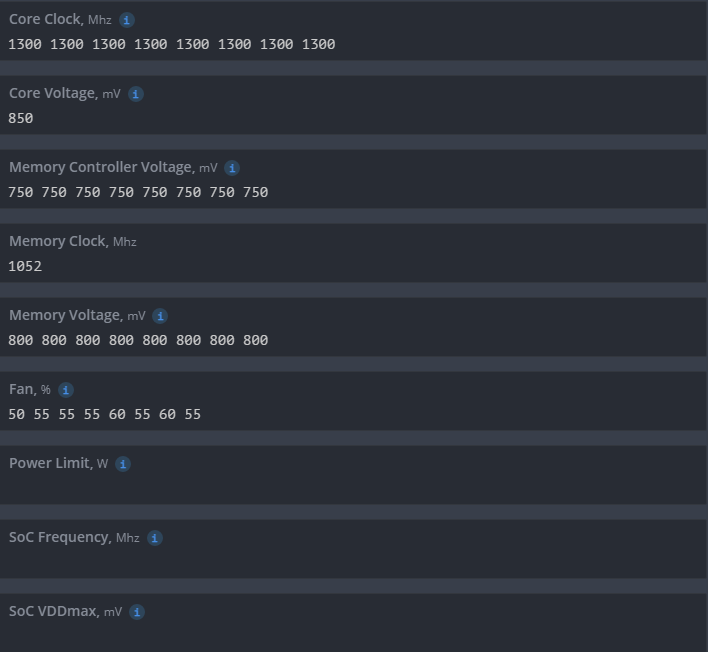
P.S. all gpu’s are running with no BIOS mod.
1 Like
ya it cant take the heat of 1400 core clock and throttles maybe? I am thinking perhaps bad thermal pads? Regardless my hash goes up as lower my core clock. I really wish I knew what parameter wattman uses when adding power limit because it takes me right to 61 in a flash. Thanks I will try NB.
53 MHS on NB… this card licks! YA I havent seen any mods anywhere online for the 6800 yet. I am sure this card has a lot more potential. People used to think 5700xt were dogs and look at them now. Radeon just tries to discourage mining so it take a while to get all their mining power unlocked. Anyways thanks for trying at least it confirms i am doing everything right. My OC profile is very similar to yours.