



Force flash it.
I did it. it work but the card is not reconized by team red
how does it report on dashboard?
This sadly does not work for 6800 reference cards, they just show up as navi 21 when you flash this bios.
1 Like
I listed cards i tested it on, and worked for me, I guess it is due to pcb design
same here

 still idling
Same issue, PM still does not work with my 6800 reference cards
Did you guys try any flags?
Hi guys,i have one rig with 3070 and want to make one more with 4 rx 6800 xfx, can you tell me does this cards works normaly on hive os?
Based on what you said in your previous post, i decided to try to flash my cards
I own six Sapphire Pulse RX 6800, all of them mined with various hashrates (same settings) : between 57.x to 60.x mh/s
The flash with the Asus bios was successful, now all cards are mining at around 61 mh/s (TeamRedMiner), @110w (previously it was 115-120), confirmed at the wall. All in all, it worked without any issues, i might try different overclock settings to see if i can get better results without impacting power consumption too much
Thank you
yep i have seen most improvments on sapphire cards myself.
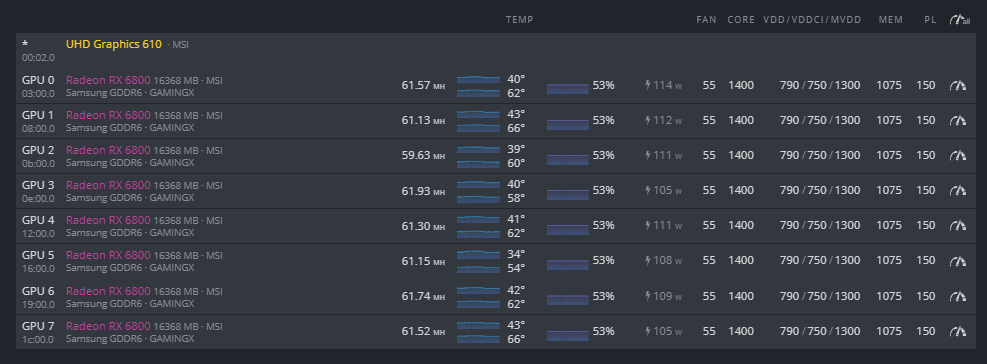
Very Thanks for this Settings… it´s Great. I hope it is Stable
1 Like
Should be fine; I’ve been stable for months only rebooting when updating.
I’m also using TeamRedMiner.
The original BIOS the cards came with.
Download the latest HiveOS image to get the latest AMD drivers (I had no luck in place upgrading).
8GB RAM in the rig not 4. 

It also Works with Powercolor , thanks i am very happy with this Settings… Hashrate Top, Temps Top, and low Power Great…
1 Like
Reference cards are shity to tweak. Sad 
Do you really need to put PL settings on the card when actual wattage shown is actually way lower?
this is only for reassurance and as a protection that power consumption by core will not be higher than this figure