

Nice one. Done Now i have for both 3060Ti 127w.
For 3070 Gigabyte to increase Mh, do you have some tweaks?


Nice one. Done Now i have for both 3060Ti 127w.
For 3070 Gigabyte to increase Mh, do you have some tweaks?
what you are saying is spot on mate when i read your reply i thought did write that lol
i don’t have other tweaks… these are my settings. I lock the 3070’s on 690Mhz (gives me a little better efficiency than your 1060 core setting) and the 3060ti’s on 915Mhz.
Check my old screen shots, your overclocks are bad
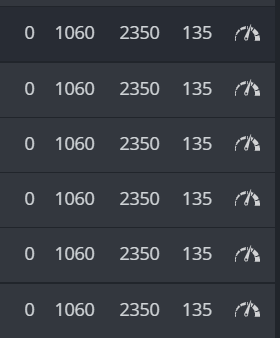
Hello to all.
I have 2 x gigabyte rtx 3070 eagle oc, 1 x gigabyte rtx 3070 gaming oc and 1 x gigabtye rtx 3070 aorus.
What is the best and most stabil oc settings for each cards?
Are the settings correct?
Thanks in advance.
No they’re not right…
Instead of -1060 use +1060 core speed
The memory clock can be in the range of 2200-2400 and higher, if someone is not afraid,
but as it is with this CORE clocking, some have -800, -500, -200, 1000, 1060, 1100 and I have already seen +1100, which the compartment is safe for 3070 (I have just KFA2 DUO samsung DDR6)
What are your current settings now for a stable OC. I have this same card but I am getting some invalid shares. It would be much appreciated. Also, do you have a delay in seconds before applying an OC.
Hello guys, the core speed is usually lowered, but everyone raises it to +.
what is the reason of this?
Isn’t it harmful to raise it?
Shouldn’t it be lowered (-)?
Can you tell the difference between lowering and upgrading?
Isn’t it the same to raise Hiveos with our normal hand, not as a code? What are the differences?
#onurfirat
With 3070 mining, the CPU is not used for calculations, but only memory, so in order to lower power consumption, its clocking is reduced. I also wonder why some people will raise its clock rate at ETH. I tested different values and it didn’t have much effect on MH.
The memory on my cards has a base clock of 1750Mhz, i.e. 2200 is already a 27% increase, I have seen those who raise to 2800 (i.e. by 60%) and with maximum cooling the cards work stably, the question is how long will such a card work?
I am not a pro, so I try to answer as much as I can on the basis of my own trials.
core clock is lowered in both cases but there is a diffenence.
a negative value represents an core clock offset. So if you fill in 400, it will lower you clock with 400Mhz
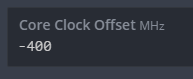
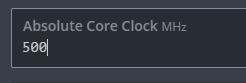
a positive value (above +500) represents an absolute core clock. So if you fill in 1060, the core is locked on 1060mhz… 1060mhz is also lower than nominal core speed.
 .
.
The big difference between them
If you use the core offset and power is below the power limit, the card will raise the core speed to meet the power limit, so the card will be less efficient.
If you use the absolute core setting, core speed will be locked. resulting that the card use only the power that it needs. Which can give you a lower power consumption…and better efficiency.
where do I write the absolute core clock settings
as I understand it
If I enter a (-) value, I lower the current core speed of the card. If the card works in 1900, when I type -400, I reduce it to 1500.
But I did not understand the enhancement thing. Why can’t we write 1060 or +400 when we write +500, what will happen if we set +600 or what will happen if we write +1100
it doesn’t work with the absolute core clock optimisation. It would simply work as before i.e + / - core clock. Absolute core clock now on all my rigs. super stable and temps always kept low with the bonus of lowered wattage. Game changer 
The text will change automatically when you set an +500 core clock speed. it is just the same input window…
Check this thread System Changelog and News - #41 by hiveos


