



No issues currently, at first 1 fan would stop but i updated the driver and reset the settings and min fan at 60% all fans are spinning currently and haven’t had any issues with it since. I also for safe measure updated the linux packages.
1 Like
TY!
What driver version is that? Everything is running well right now on version 455.45.01 except the fan.
And how did you reset the settings? Via Linux command line? What command exactly?
@Cryptosynapse on linux shell do
apt update
nvidia-driver-update to update the driver to 460.39
then nvidia-driver-update --nvs to reinstall the nvidia settings
Also I did an apt upgrade as well on my linux machine to upgrade any package that was upgradable.
Another thing I did on my board is make sure my PCI-e was in GEN2 or else i’d get a X Server Start error and OC settings would not apply until GEN2 was applied.
1 Like
Great reply - Thanks. I have migrated 1 rig to Hive from NHOS last week.
I’m good on the BIOS settings. Although, I need to turn off the internal GPU to free up a slot from 6 to 7, but man I have issues getting video output from one of the mining cards.
Current average Efficiency for 6 cards running T-Rex is 495 - 1 x 3070 and 5 x 3060 Tis.
My entire rig is only pulling about 828 watts at the wall. I’m pretty happy with that.
Let me know if I could be doing better.
BTW - this is with a i5 6600K processor I had laying around as well. Not OC’ed of course… lol.
You’re very welcome, did the 3rd fan start spinning?
1 Like
Got caught up in some other work. Will let you know. I am excited to give it a try. I’ve have been able to get the efficiency up to almost 500 across the 6 cards.
BTW do you use shellinabox, putty, etc? If so how does it work for you with Hive?
Click on the >_ icon then Hive Shell Start
Then a message will show, when completed it will have a link 1 with a browser link or second with ssh cmd. both work, i find the ssh is better than browser but both work. The connection does timeout and close so you will have to open it again.
1 Like
No joy with the fan… they are stubborn at times. The 3080 works, but the 3070, I think EVGA just stuck another fan on there without any control considerations.
Hey man - just switched from t-rex to gminer.
I went up by about 10 Mh/s.
That GPU showing below 60 Mh/s will be replaced Thursday. It is a bad sample .
That’s at 120 watts. I really appreciate the help. I still have to update the pkgs, but I will wait until profitability slumps again.
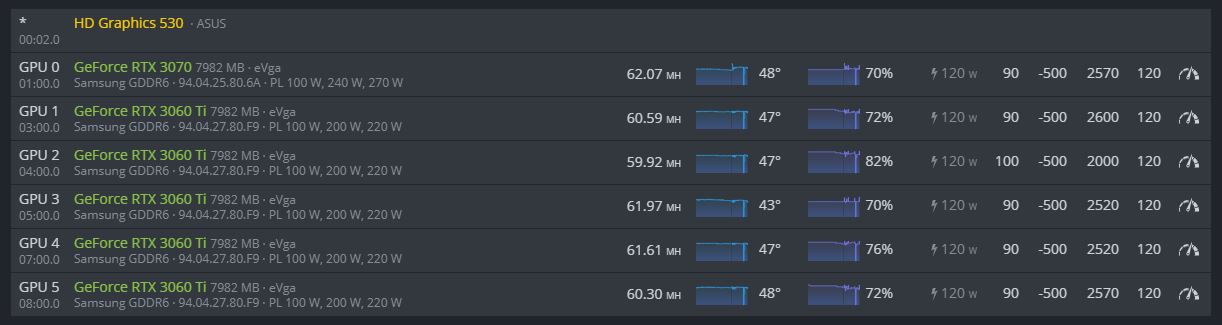
Thank you so much for your help. I took your information about the fans and posted it in a discussion about that.
Everything is super stable with my HiveOn rig, and I will move another to it tomorrow. Goodbye Nicehash.
Thanks again.
No problem, happy to help and learn more and more 
Hi Guys, I am new. can anyone tell me after updating/editing the OC settings, Do I need to reboot the miner or it will pickup automatically new OC values.
1 Like
As soon as you apply a new OC the rig will respond. There is a way to specify a delay and some miners feel that setting a long delay (I have seen 120 seconds) allows the DAG to be created before OC’ing and that this helps with error reduction. I have not seen a difference. The default is 5 seconds. I have mine set at 20 seconds. The cards will kind of ramp up to those OC settings.
I have pretty aggressive OCs on my 3060Tis with error rates at less than 0.5% (half a percent).
The cool thing is you can adjust OCs on the fly for individual cards and I do this based on errors. IF I apply an OC, I watch for errors and detune a card or cards based on that information.
Also I strive for efficiency more than hashrate.
Efficiency is calculated by taking a card’s hashrate/watts used.
(61.02 Mh/s x 1000) / 120 watts = 508.5 kH/J as an example.
This is one of my cards and that is a really good efficiency.
Check this article out: NiceHash - Leading Cryptocurrency Platform for Mining and Trading
Even though this is from Nicehash ALL the information is solid. Check out the discussion on efficiency.
2 Likes
Here is some other helpful information as well:
Linux commands
apt update - shows available Linux package updates
apt upgrade - applies ALL the updates available
nvidia-driver-update update the driver to 460.39 or whatever version you choose
nvidia-driver-update --nvs to reinstall the nvidia settings
BIOS - Ensure PCI-e on motherboard is in GEN2. You might or will get X Server Start errors and OC settings will not be applied.
Also check this out for BIOS settings - again this is NOT just for Nicehash. This is for all miners.
https://www.nicehash.com/support/mining-help/nicehash-os/nhos-recommended-bios-settings
2 Likes
Thanks for help.
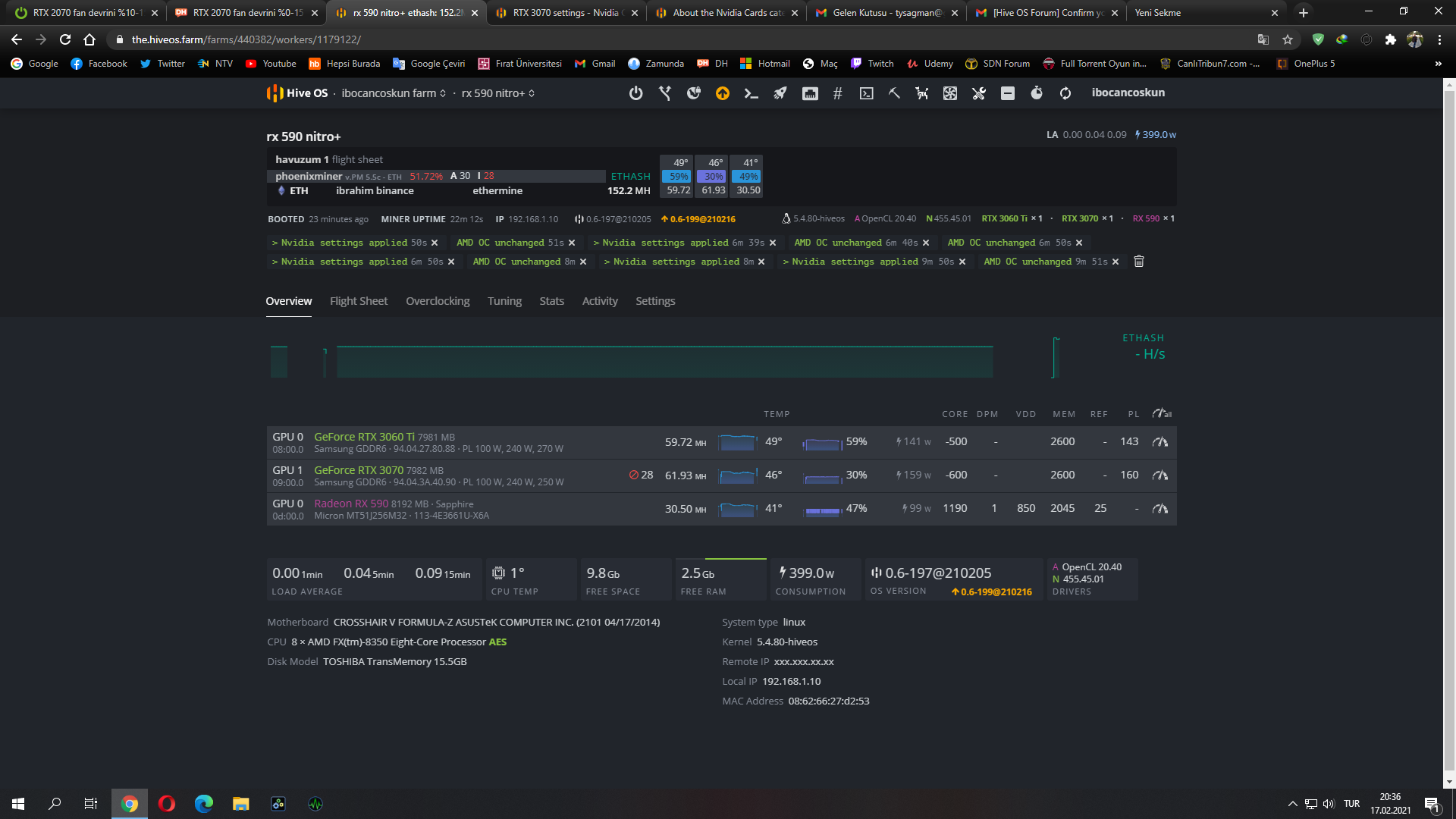

Yeah start off by putting your power limit at 120 put your core under clock at -500 set your memory to 2200 and put the time to lay it 60 seconds restart the miner.
1 Like

I just gave you the best options. Bump it up from there and find out where your card starts throwing errors. Leave the core clock at -500. Leave the power at 120 w atts, an increment the memory by 30, until you start throwing errors then back it down. You asked for help I gave it to you and give it a try
4 Likes