



Cooling is one big issue with server cards. They were designed to be in an enclosure that forced a lot of air through them, and most of them weren’t using the processor itself at full speed.
If you pull up “amd-info” on your rig, you’ll see that while most “commercial” cards have only one speed for the processor, that (at least with my S9150) they have several. If you run the processor in one of these slower states, it will probably run cooler.
Also, with the latest updates, it looks like you might have a tad more control with these cards.
I’ll let you know more when I switch flight sheets.
any updates with the latest version of HiveOS?
The current cooling solution I’m using is the one I had planned for my NVidia Tesla K80, that I had determined was way underpowered for a dual GPU card. It just happened to fit my FirePro S9150 very well with slight modifications. It even worked out to have a slot for the mini 4 pin adapter I used for my fan.
I did finally get my cards to run. I had to wait until another flight sheet had completed, so I could switch miners to phoenixminer.
When I switched, I looked up the basic arguments I would need to add for the cards to work properly, including cooling. By adding { -ttli } you tell the gpu that when it hits a specified temperature, to throttle back until it reaches the specified temperature. It reduces the hash rate momentarily, but it keeps it from rebooting.
I have my temperature set at 53*c. Right now the 5700’s get nowhere near that. The S9150’s can get close, even at 100% fan speed for right now. I’m also researching a solution, but this works for right now. The server cards have been solving shares that are over One Terahash occasionally.
The other arguments are turning on the drive that server cards use, so that will work more efficiently. I can’t BIOS mod them but, They can be worked with. And for a tad less than $200 (American) They were roughly what i paid for the RX 5500 XT they replaced back in Nov 2020, that are now selling for $500 (FFS! WTFBBQSauce?!?!)
But the string of arguments makes them run a bit smoother, until you can mechanically modify them for better cooling. There are several inexpensive modifications if you’re bold enough to pop the case.


1 Like
fantastic work! looking forward to seeing more results. they do draw a good bit of power for their hashrate, though. have you been able to check at the wall?
any updates to share here?
Updates.
Yes, they are power hungry.
Yes, they are a beast to keep cool. The current modification is only effective with ambient air temps under 20* C. I’ve found a company that sells a universal GPU heat sink built more like a traditional PC style heat sink. I’m waiting for one to come for number 3 that I tried to outthink the engineers. It can only function properly around 5* C and under.
Currently, a window fan, and a ton of ducting is the “until I get my parts” solution.
Those temperatures make the rest of the computer unstable. When I get the temperature workaround figured out I will update you.
As for control, they do what they want to. I can control fan speed, and I can control wattage with temperature arguments, but that also lowers hash rate. Most of this boils down to miners not using the same Kernel as Tech companies designing CAD-CAM software and say, mapping the universe.
People writing mining software weren’t expecting people to use cards that were the cost of a decent used car from a New car dealer, that wasn’t used for PCs in the first place.
I’m doing the hot rod equivalent of stuffing a B-6 Cummins into a '32 Ford rat rod, and using a Banks CPU to get it rolling down the road. No big deal. Just another day.
1 Like
I bought this fan from amazon and jury rigged it to mine. I am getting 26.5MH/s using the hawaii bios editor and this seems to be fairly stable. I get around 1 reboot a day but it doesn’t bug me as the card is running its its own ‘quarantine’ box.
https://www.amazon.com/gp/product/B08P1S5DBN/ref=ppx_yo_dt_b_asin_title_o03_s00?ie=UTF8&psc=1
@FreemanMaudib I noticed you have OC settings there. I wasn’t able to get any OCing to stick to mine using the hive UI, so the hawaii bios editor was the route I took.


I haven’t done any overclocking, I’ve just told it to use the temp sensor as a throttle pedal, and from boot either card only use around 135-137w when they’re running at peak.
My next step in cooling solutions is to basically convert it into a “naked” R9 “Deluxe.” with a real GPU fan and heatsink with individual heat sinks for the memory chips and MOSFET transistors.
Where did you get the BIOS for the card? I have a 3rd card that only maxes out at 23.5 MH/s, and If I were to edit the bios, I’d like to do all 3.
I started using S9150s due to their low price and high amount of VRAM.
I have 4 of them, with 6 more coming from eBay ($88 EACH WITH SHIPPING!!  )
)
My cooling solution was just to use a holesaw to drill a hole in side of the plastic shroud, bolt a 90mm fan to the hole and connect the fan to an external power splitter. Then just use tape to block off the rear opening of the shroud. The whole process takes like 5-10 mins per card, max.
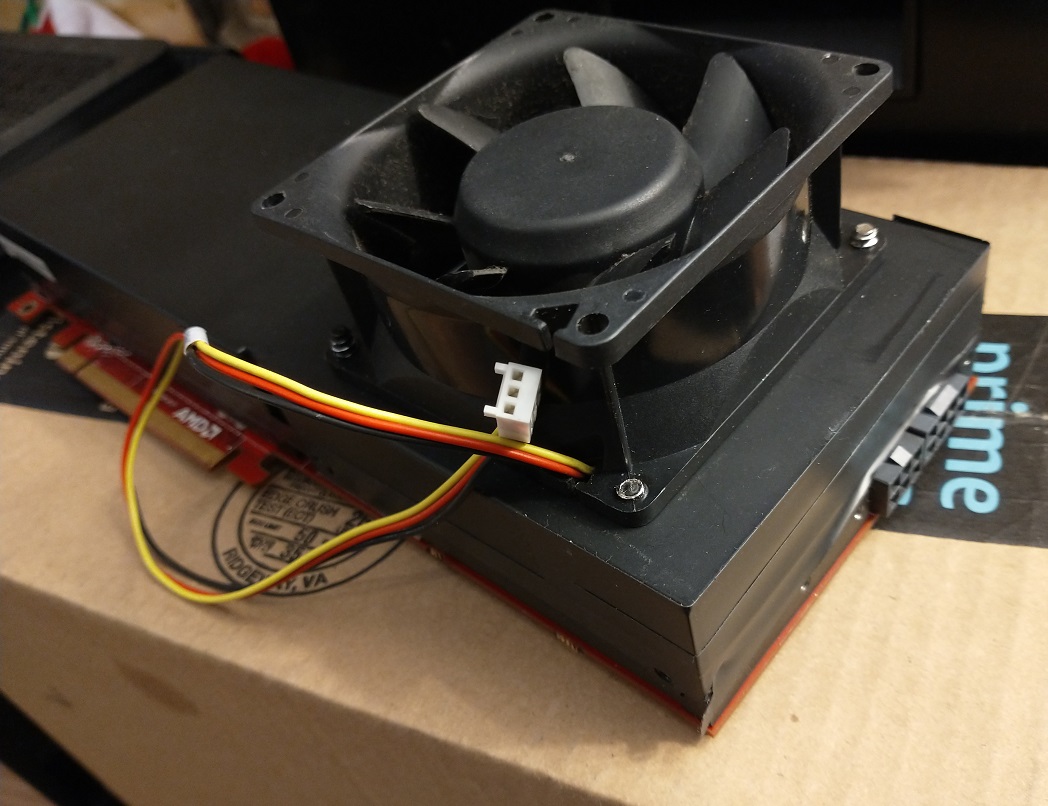
Temps are usually 60-75C for the four S9150s I’m using now as long as I keep airflow on the backplate to cool the rear of the PCB as well.
Power consumption is about 180W per card from the wall with a Kill-A-Watt meter.
Modded Dell Firepro S9150 16GB BIOS ROM with 1000Mhz core clock and 1000Mhz memory clock, and 1100mv core/mem voltages. Constant 28.6Mh/s in Phoenixminer in HiveOS. Works with Dell and HP Firepro S9150 16GB cards.

My custom BIOS is here:
https://gofile.io/d/8Tfjg7
Flashing the ROMs took a lot of tries… kept failing in my Windows desktop over and over again. I had to go into Safe Mode AND uninstall the card from the Device Manager before it would flash with any reliability.
I tried that with one of my cards, except I bought an adapter to use the onboard fan control/power so i could regulate it from the control panel, even though I leave them at 100% almost all of the time anyways. I have concerns about running the cards at those temperatures, as they just don’t seem to run that stable for me, and keep rebooting. They love operating in the 45-50*c range, and can go an entire week without rebooting, if there aren’t any other reasons for a restart.
I will give the custom BIOS a try on the card I’m customizing right now. I’ve removed the cover and the huge passive heat sink, and I’m basically turning it into a “R9 Deluxe” by using individual heat sinks for the memory and CMOS transistors, and an “Active” fan powered heat sink for the GPU.
It’s going to be the ‘rat rod’ of server cards. Hopefully, this will make them a viable alternative to the crazy prices and non-availability of new cards.
Thanks for the tips.
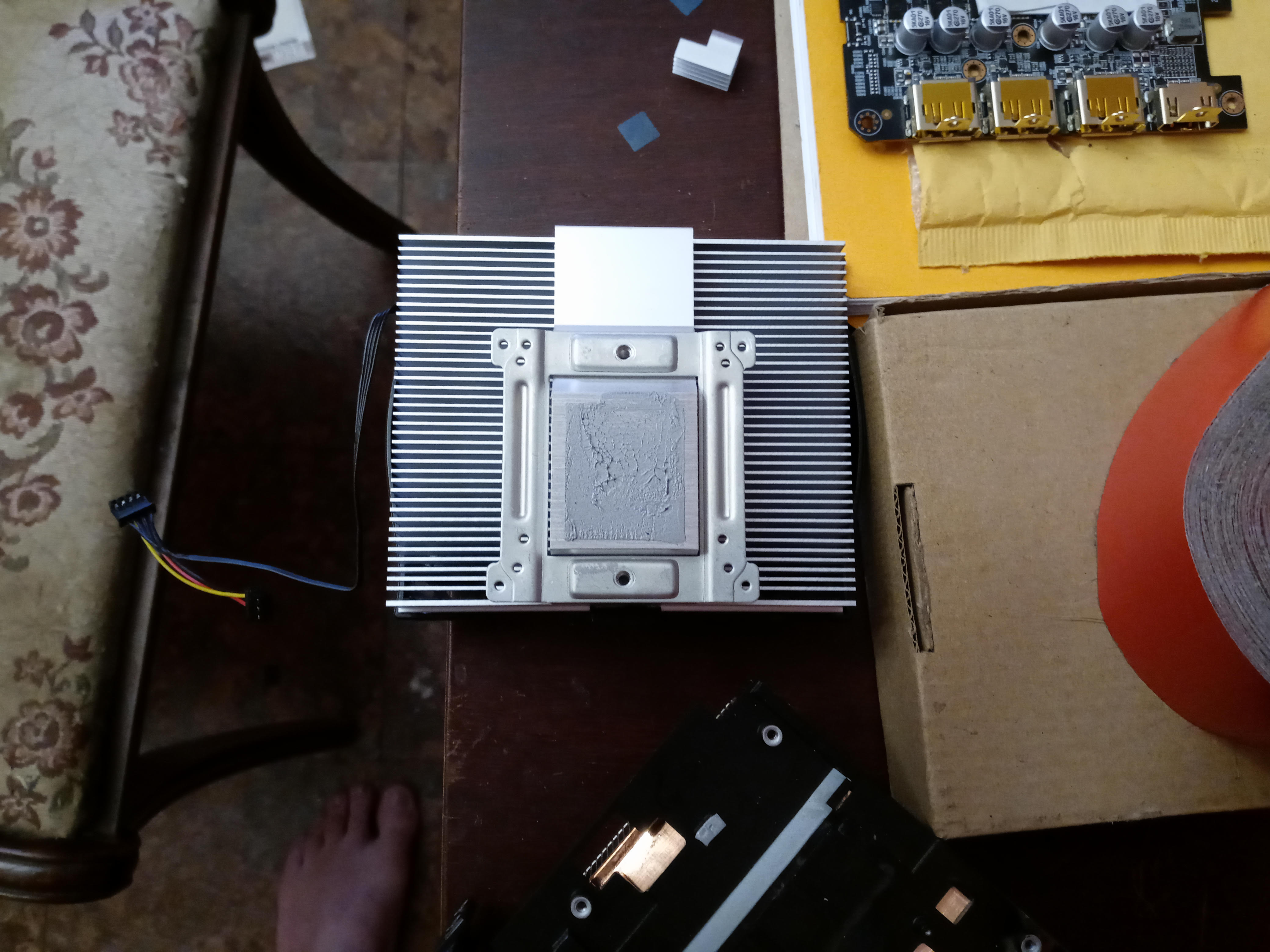
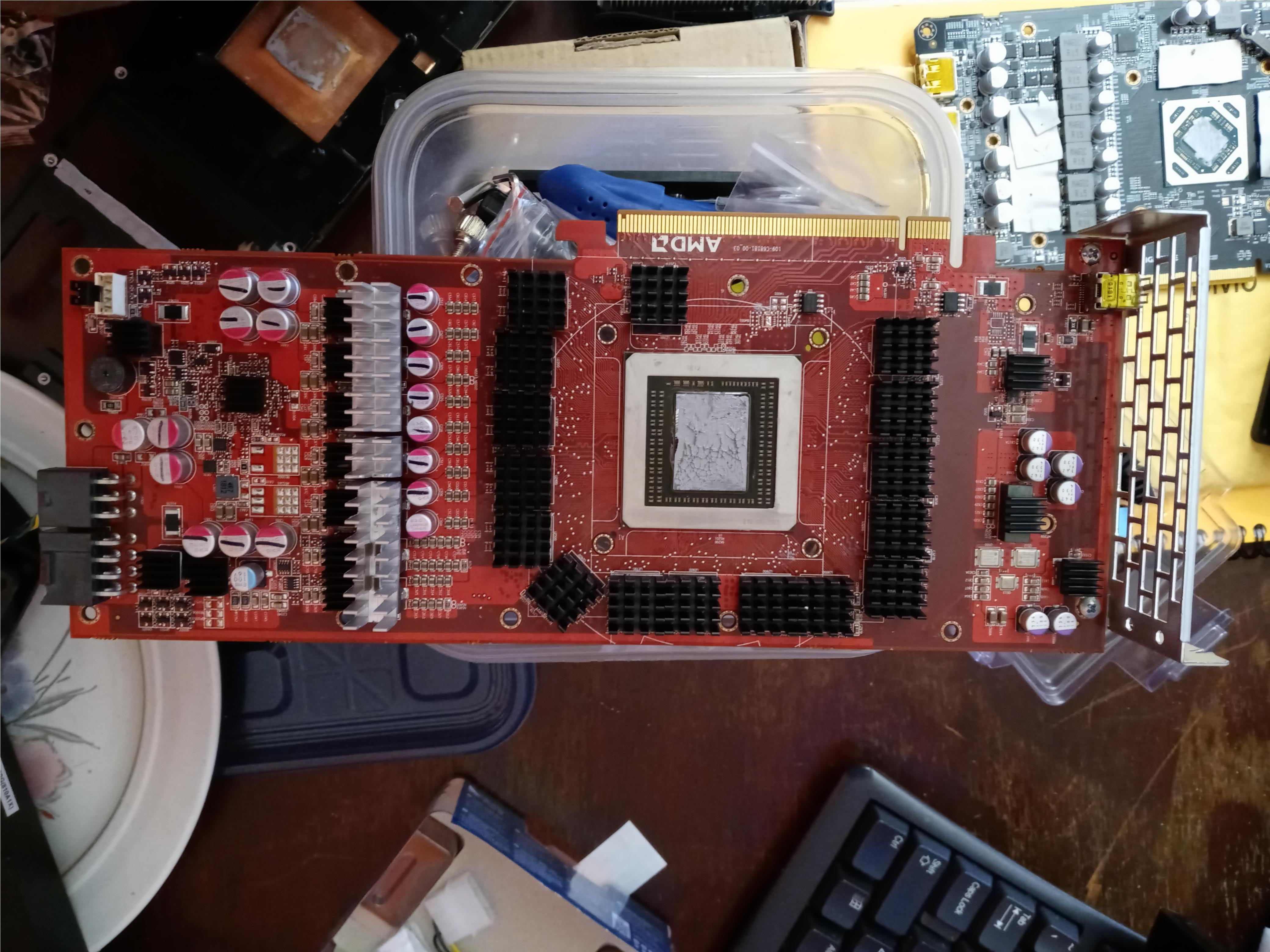
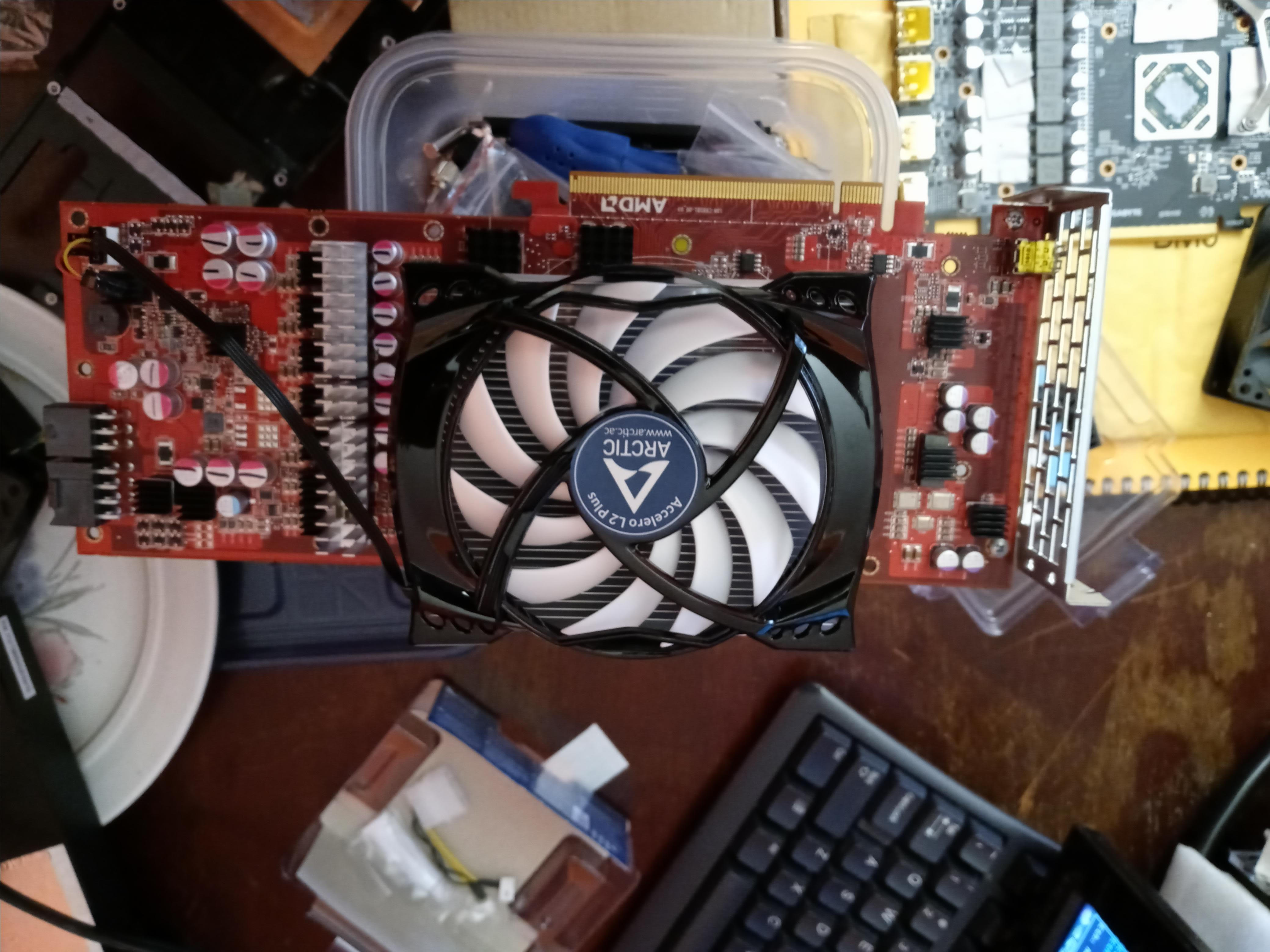
I considered watercooling the chip and putting those heatsinks on all the RAM and voltage regulators, but the cost per card would have been prohibitive.
It’s just way cheaper to run the original heatsink and add a fan. I also happen to have a ton of old fans around my house.
Temps in the 60’s are nothing for the Hawaii chips… they run HOT … if you look at people mining and gaming on the R9 290X and 390X, they usually run in the mid 80’s the entire time!
Tell me how the BIOS works… my cards have been rock solid.
1 Like
Hi there. Could it be a driver error? : Autofan: GPU temperature 511 is unreal, driver error
I got random 0 Mh/s with 100% in my rig. There are 6 cards in it. I have tried to lower the tuning, but as the miner starts, randomly 2 cards failing…
Is there any solution for this issue?
In 95% cases it’s power issue and rest 5% some cards return similar data when it totally hangs due OC
1 Like
What kind of hardware are you running?
Please put your rig info in your next response (cpu, mb, psus, type of risers, and gpu (and bios, modded or stock).
Also, if possible, screenshots of your hiveos settings.
I tried to do the bios mod through hiveos, but it wouldn’t take.
I have another card coming. I’m going to stick with the snail shell coolers for now. At least they make temps more reasonable than trying to outthink a GPU manufacturer.
Hi. Im hoping to piggy back on this thread. Will this work for any AMD gpu, or us it only for the RX family and up? I’m having a ton of stability issues with my R9 390 rig. I’ve been getting the GPU driver error, no temps message then my miner shuts down. Most of the time only 3 of the 4 cards boot back up and I have to remot shut it down for a 120 seconds and boot it back up to get it to recognize the 4th card. I feel like it’s a driver issue, but I have no idea what driver I need. Any help would be appreciated.
Will “what” work?
If you want stability, you need to figure out why it’s unstable.
I think you should open a new thread and put your entire rig configuration in it.
We don’t know anything about your rig except that you have 4 R9 390s
I apologize for any issue I might have caused by posting here. I did start my own thread about the error I was getting with the run down of my system. However, I will give you a run down of my system.
CPU: i5 4590
MB: ASrock H81 pro R2.0
RAM: 8gb 1600
GPU: 4 R9 390
SSD: 128gb
PSU: 2 850w 80+ gold Rosewill
The error that I keep getting is GPU drivers not detected, no temps
The script has been updated to include the new drivers also
are there any plans to update to 20.04 and beyond?
1 Like